
The Architecture Behind the Blog: From Zero to Production
By Dom Reilly · Posted 10 Aug 2026 · 3 min read
Originally, I developed the blog end-to-end using Blazor server side rendering.
My plan was to create a product that could be used and installed by anyone. I wanted to create my own successful open source project, my own Umbraco you might think. Or, at least something to show off my Blazor skills!
All was going well, I ran into a few speed bumps, mostly around razor class libraries and other bits and pieces, but mostly it worked.
The project sat dormant in my GitHub for a period of time with close friends asking about it, but like most of my other personal projects, I’d lost the passion for it and the steam to push it forward.
I forced my self to work on it, desperate not to have it fail like so many of my other projects.
I converted the Data access to use MySQL rather than SQL server, because I was still under the impression that SQP express had a 10gb limit per database that I didn’t want to eventually run into. Plus I wanted to play with docker and MySQL is quick to configure - not that SQL Server containers aren’t!
Over the next few months, I started to dabble in Go. More and more exploration was performed and I started to think what if I rebuilt the blog, or at least the backend as an API in Go.
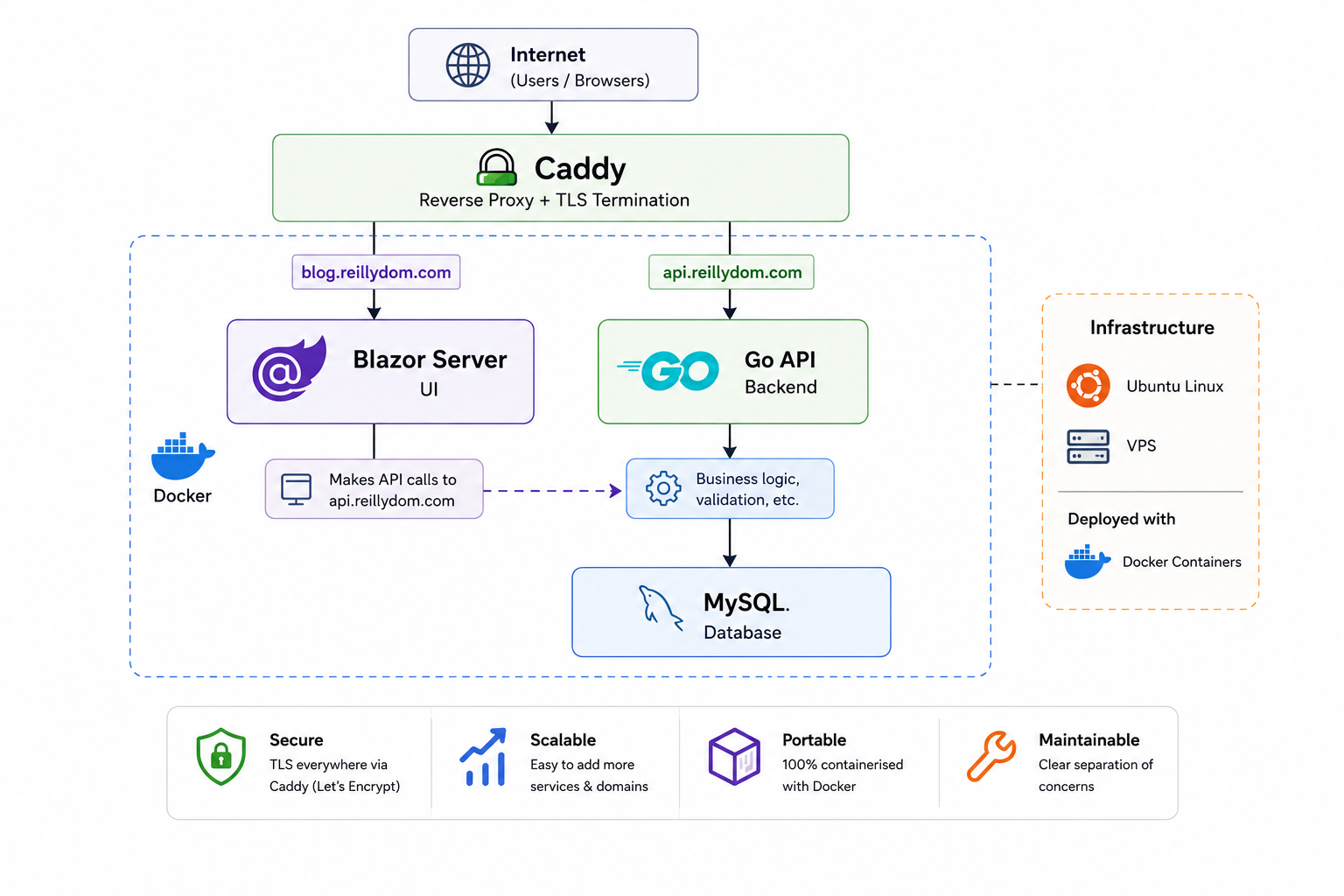
So, in typical me fashion, I started to rebuild the project, and separate out the concerns, choosing to leave Blazor running the UI and have a Go based API that used MySQL as the DB store.
Roll on Codex.
Around this time, OpenAI released Codex and gave us a free trial with an enormous token limit.
After fiddling with a few projects, it suddenly dawned on me: I could get Codex to do all of the grunt work with converting the outstanding C# code to Go and have the API MVP working. And that’s exactly what I did!
Eventually, after lots of bug fixes and issues, along with insisting that codex builds an automation suite for testing, I had an MVP. Finally!
Next step was to containerise it all, and that’s exactly what happened next. I started the manual process and had Codex review each iteration and suggest tweaks or bug fix etc.
Once all of this was done, I was able to launch the Blog on a VPS provided by OVH!
During this refactoring time, I decided to make the blog UI and API private repositories, especially as I was working so heavily with AI.
Roll on to the next issue: I needed both the UI and the API accessible behind a single IP address. The solution? Caddy as a reverse proxy.
By routing requests based on the domain name, Caddy allowed both the UI and API to share the same IP address on port 443 with no side effects. As a little bonus, it also made it easy to add more domains and services later without changing the overall setup.

Keep reading
Related articles
The Most Valuable Column Nobody Thinks About
While investigating some unexpected data, I was reminded of a lesson that's followed me throughout my career: timestamp columns never seem important until the day you need one. It's a small design decision that...
Read moreEmbracing Docker: A Journey from Hesitation to Actually Using It
I avoided Docker for years, unsure how it would improve my .NET Framework workflow. After struggling to replicate production issues locally, and some investigation; it became clear how valuable consistent environments...
Read more